


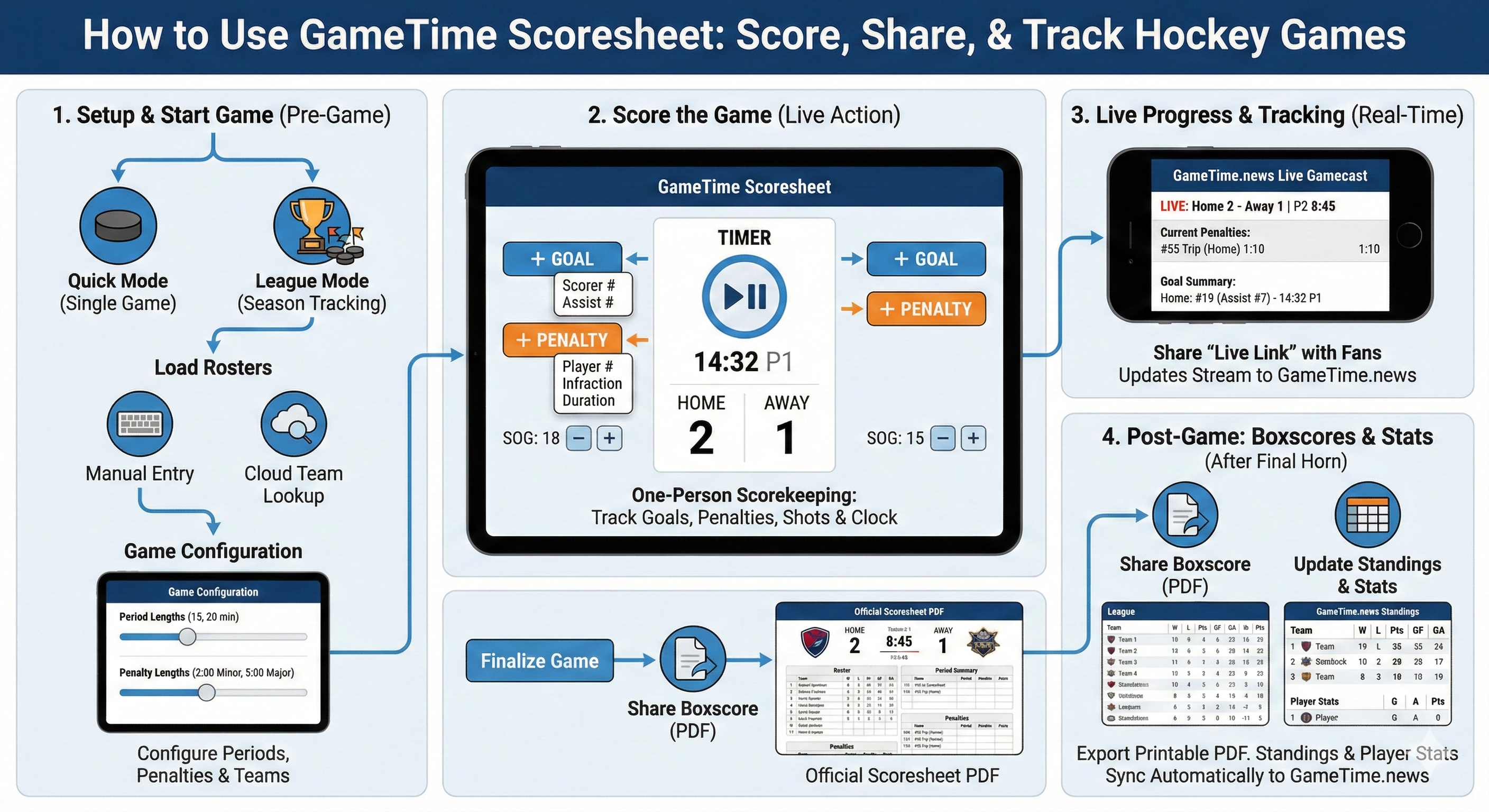
User Guide
1. Setup & Starting a Game
Before the puck drops, you need to configure the game environment. The app offers two primary modes: Quick Mode (for single games) and League Mode (for full season tracking).
Quick Mode
Best for scrimmages or pickup games. No setup required; just jump in and score.
League Mode
Use this to track standings and stats over a season. You must create a "League" within the app first.
2. Load Rosters
- Tap "Team Management" to add players manually or use the Cloud Team Lookup to find existing rosters.
4. Scoring the Game
The interface is designed for one-person scorekeeping. The workflow mimics a paper scoresheet but automates the math.
| Action | How to Do It |
|---|---|
| Start/Stop Clock | Tap the large Timer at the top center. Tap again to pause. |
| Record a Goal | Tap + Goal under the relevant team (Home/Away). Select the Scorer (#) and Assist (#). |
| Record a Penalty | Tap + Penalty. Select the Player (#), Infraction Type (e.g., Tripping), and Duration. |
| Track Shots | Tap the SOG (Shots on Goal) + or - buttons near the team score to track goalie stats. |
5. Live Progress & Tracking
One of the app's core features is streaming the game state to the cloud so fans can watch a "Live Gamecast."
Enable Live Stream
Ensure your device has an internet connection (Wi-Fi or Cellular).
Generate Link
Inside the game screen, tap the "Share" icon (usually top right).
Share
Select "Share Live Link". You can text or email this URL to parents and fans.
What Fans See
They will see a real-time updating webpage on GameTime.news showing the clock, score, current penalties, and goal summary.
6. Post-Game: Boxscores & Standings
After the final horn, you can finalize the data for records and league tables.
- Tap "Export" or "Share PDF".
- This generates a clean, printable scoresheet resembling a traditional paper record.
- If you are in League Mode, the result automatically syncs to GameTime.news.
- Go to the Standings tab in the app or the website to see updated Wins, Losses, Points, and Player Statistics (Goals/Assists leaders).